Real estate CRM: turn every contact into an opportunity

Centralise your leads, structure your sales cycles and give your teams one shared view of clients, properties, developments and opportunities.

Talk to an expert See the case study
HubSpot Elite Partner
800+ clients supported
10+ years of HubSpot expertise
Your challenges

Contacts everywhere.
Priorities nowhere.

In real estate, much of sales performance comes down to the ability to handle enquiries fast, assign leads to the right people and keep the relationship going until the decision.

In multi-agency or multi-development organisations, this complexity grows further: several teams may work the same territories, products or client types.

Copernic expert auditing HubSpot data
01. Acquisition & leads

Is every lead really handled as fast as it should be?

Property portals, ad campaigns, forms, events, calls and referrals can generate a large number of contacts. We structure their capture, qualification, assignment and follow-up so opportunities do not get lost between teams.


Observable signal

Leads still land in several inboxes or tools, and their assignment depends on spreadsheets, manual rules or human intervention.

HubSpot workflow expert
02. Qualification

Do your sales reps know right away which leads to prioritise?

Not every contact has the same maturity, project or potential. We structure the criteria that separate project, budget, location, timeframe, property type or level of interest according to your business.


Observable signal

Sales reps mostly handle leads in order of arrival and have little information to prioritise high-potential prospects.

Consultant auditing CRM processes
03. Distribution & network

Can your multi-agency organisation really be steered?

A real estate group or network can span several agencies, territories, teams and sales managers. HubSpot can structure the assignment rules and visibility needed to distribute leads while keeping a global view of the network.


Observable signal

Leadership struggles to get a consolidated view, while each agency works with its own spreadsheets, tools or tracking habits.

Copernic expert in HubSpot reporting
04. Properties & developments

Does your CRM link each prospect to the right property or development?

Much of a real estate CRM's value comes from its ability to connect contacts, projects, properties, developments and opportunities. We design a model precise enough to represent your business without turning HubSpot into property management software.


Observable signal

Sales reps see available properties in one tool and prospects in another, with no easy way to match the two.

Copernic consultant in HubSpot CRM architecture
05. Follow-up & nurturing

How many prospects are dropped for lack of follow-up?

A real estate project can take time. Prospects who are not ready right away must be re-engaged at the right moment through tailored marketing and sales scenarios.


Observable signal

Sales reps follow up from lists or personal reminders, and some contacts end up dropping off the sales radar.

Copernic experts in HubSpot adoption
06. Steering

Do you know exactly which channels, agencies and developments drive your performance?

A real estate CRM must connect lead source, sales rep, agency, development, property, sales stage and outcome to identify the levers that really perform.


Observable signal

You know how many leads you generate but struggle to see which channels, agencies or developments actually turn those leads into revenue.

Real estate CRM

What is a real estate CRM?

A real estate CRM is a system that centralises and puts to work all information on prospects, clients, companies, properties, developments, opportunities and sales interactions.

It lets Marketing and Sales teams follow each contact from acquisition to the completion of their project, while keeping the history of interactions and opportunities.

In a real estate group or agency network, the CRM must also handle complex organisations: several agencies, sales teams, developments, property types or markets.

The CRM does not necessarily replace the specialist software that manages properties, listings, transactions or real estate operations. On the contrary, it must move the useful information between these systems.

  Leads & acquisition
  Properties & developments
  Networks & agencies
  Sales & client relationship

A buyer calls in the evening. Your CRM answers.

In 30 minutes, we analyse your lead journeys, your sales organisation and your tool ecosystem to identify the main friction points and the priorities for your real estate CRM.

Industry expertise

We know real estate.
And that changes the project.

Real estate players handle large volumes of contacts, variable decision cycles, several property types and sometimes organisations made up of many agencies, developments or entities.

At Copernic, we build HubSpot around your real estate model: acquisition, marketing of properties, lead management, client relationship, network coordination and performance steering.

The CRM must not force a generic model onto your organisation. It must connect your Sales, Marketing and Service teams around the same customer data, while fitting into your real estate ecosystem.

Lead management Multi-agency & multi-entity Properties & developments

Our services

Seven levers.
One pipeline.

We work on the building blocks that drive performance: CRM strategy, lead management, sales organisation, integrations, automation and steering.

Build a CRM that fits your real estate organisation

We define a model able to represent groups, agencies, teams, contacts, properties, developments, opportunities and sales relationships.

What we see

The hard part is not creating lots of fields. It is deciding which information really needs structure in the CRM and which should stay in specialist tools.

CRM model
Multi-agency
Governance

Turn every enquiry into a sales opportunity

We structure the capture, qualification, distribution and prioritisation of leads from all your acquisition channels.

What we see

In real estate, a few hours can be enough to hurt a lead's odds of converting. The goal is therefore to shorten the time between acquisition, qualification and first contact.

Lead routing
Qualification
SLA

Structure your sales journeys around the client's project

We translate your sales methods into HubSpot: qualification, viewings, appointments, offers, negotiation, reservation or signature, depending on your business.

What we see

The pipeline must reflect real sales progress, not just the admin tasks completed by sales reps.

Pipeline
Opportunities
Automation

Link prospects to the properties and developments they want

We design the model that connects contacts, projects, properties, developments and opportunities, at the level of detail you actually need.

What we see

HubSpot must not become property management software. It should keep the useful sales information and exchange data with specialist tools when needed.

Properties
Developments
Associations

Connect HubSpot to your real estate ecosystem

We build the data flows between HubSpot and your business tools: portals, real estate software, ERP, management tools, marketing platforms or in-house applications.

What we see

A good integration starts with defining the sources of truth, data to sync, identifiers and business rules, not with picking a connector.

API
Data sync
Middleware

Keep in touch with prospects who are not ready yet

We build journeys that segment contacts, automate communications and re-engage prospects according to their project, interest or maturity.

What we see

Not every lead is ready for Sales right away. A strong CRM lets Marketing move prospects forward before sales takes over.

Nurturing
Segmentation
Automation

Steer the performance of every channel, agency and development

We build the metrics to track lead volume, response time, conversion, pipeline, revenue and sales performance.

What we see

Lead volume is not enough. You need to connect acquisition → handling → opportunity → transaction to understand what really generates revenue.

Conversion
ROI
Sales performance
Baptiste Collignon, HubSpot Project Manager at Copernic
Every unit has a buyer.
Every buyer, a follow-up.
Baptiste Collignon · HubSpot Project Manager
Case study

How Homunity, a real estate investment platform, made its CRM reliable by migrating to HubSpot

Homunity had to migrate a large volume of data while simplifying a CRM that had grown too complex. Copernic used the migration as a chance to make the data reliable, streamline the model and set up a single-contact logic.

 
Homunity logo in white
 

A HubSpot migration to rebuild a reliable CRM base

With nearly 194,000 contacts, 141,000 companies, 470,000 deals and 193,000 notes, Homunity faced a CRM base that had become hard to maintain. The migration from Salesforce to HubSpot was not just a change of tool: it was the chance to clear the accumulated data debt and rebuild a lasting source of truth.

Real estate investment CRM migration Data quality

A successful migration always starts with the data.

Context

The company's growth had gradually made the CRM more complex. Duplicates, incomplete contacts, unlinked companies and obsolete fields made steering harder and harder.

Challenge

Migrate to HubSpot without repeating Salesforce's historical flaws. The goal was to centralise data, simplify the CRM model and keep all history, in under three months.

What we did

Copernic prepared the migration rules, adopted a single-contact model, cleaned the data and streamlined fields. On some objects, the number of fields was cut by up to 90%.

Result

The migration was completed in under three months, with the main history carried over. Julien Béril, Head of Product, describes it as “a tour de force in under 3 months”.

See the Homunity case study →

What clients say

Their CRM runs.
So do their sales.

One real estate group, several businesses

“Facing many issues linked to varied integrations and specific needs across departments (transactions, sales, marketing...), together we defined a clear roadmap and precise objectives.”
J. TauvronComptoir Immobilier · Real estate

The conversion funnel, tracked

“We brought in Copernic to optimise our HubSpot, especially the overall tracking of our conversion funnel. The team, and Charline in particular, understood our challenges very quickly, despite a complex environment.”
E. ObalaSpace Management · Real estate

Two weeks to go-live

“Fast (2 weeks between the briefing and go-live), efficient, friendly, responsive... I highly recommend the Copernic teams!”
L. d’YvoireMasteos · Real estate

Scroll →

Reviews translated from French

Artificial intelligence

AI sorts your contacts.
Your sales reps call back the right ones.

Real estate teams handle a large volume of leads, emails, calls, enquiries, meeting notes and sales data every day. AI can help put this information to work faster and focus teams on the prospects and clients who really need their attention.

AI in marketing production
01

Qualify leads faster

AI can help analyse the information in an enquiry to identify project, need, location, budget or maturity, when this information is available.

02

Sum up a prospect's history

Emails, appointments, calls and interactions can be summarised so the sales rep quickly recovers the context of a project before a follow-up or an appointment.

03

Spot prospects to re-engage

Analysing activity and interactions can help surface contacts showing re-engagement signals or a long period of inactivity.

04

Automate sales tasks

Meeting notes, email drafting, information searches or activity summaries can be sped up with AI to cut the time spent on admin tasks.

HubSpot

The whole platform.
One partner.

HubSpot brings together Marketing, Sales and Service around the same customer data, while connecting the platform to the specialist tools of your real estate environment.

01. Acquisition & leads

Centralise and convert your real estate leads

HubSpot centralises enquiries from every channel and structures their qualification and assignment.

HubSpot AI

Breeze can help teams put the information in the CRM to work faster and prepare some actions.

HubSpot contact management
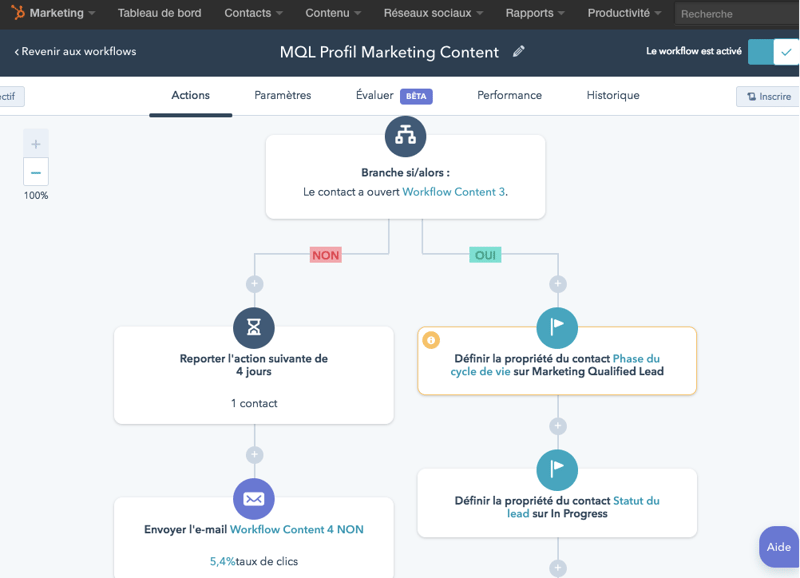
inbound marketing workflows
02. Marketing automation

Nurture prospects throughout their project

Not every prospect is ready to buy or rent right away. HubSpot lets you build journeys tailored to their profile, interest and maturity.

HubSpot AI

The AI features can help produce and adapt some marketing content.

03. Sales

Steer every opportunity through to the transaction

HubSpot pipelines structure the stages of your own sales process and track the actions needed to move opportunities forward.

HubSpot AI

Breeze can help sum up the context of an account or opportunity and ease some sales tasks.

HubSpot deals
Smart CRM HubSpot - tool integrations
04. Data & integrations

Connect HubSpot to your real estate tools

HubSpot can connect to the applications that manage the data or operations specific to your business, to keep a consistent sales view.

HubSpot AI

Data and AI capabilities make it possible to use more of the context available in the CRM.

Copernic in numbers

10+ years of HubSpot expertise.
Technical and business.

We help real estate players structure their sales processes, optimise their lead journeys, integrate their tools and make their data reliable.

800+clients supported
1,200HubSpot hubs implemented
130HubSpot certifications
4HubSpot accreditations

Key takeaways

Your leads come from everywhere.
Your pipeline, from one place.

In real estate, sales performance depends as much on the ability to generate leads as on handling them fast, qualifying them and turning them into opportunities. At Copernic, a high-performing real estate CRM brings marketing, sales and operational data together to follow every prospect and client over time.

  • Centralise leads, contacts, clients and accounts.
  • Structure the management of properties, developments, mandates or opportunities.
  • Distribute leads automatically to the right teams or agencies.
  • Connect HubSpot to business tools and real estate platforms.
  • Automate follow-ups and marketing and sales journeys.
  • Steer conversion, velocity, revenue and performance by agency, development or sales rep.

FAQ: real estate CRM and HubSpot

What is a real estate CRM?

A real estate CRM centralises information on prospects, clients, companies, opportunities and sales interactions. It also structures lead management processes and, depending on the chosen model, links contacts to the properties or developments they are interested in.

Why use a CRM in real estate?

A CRM centralises leads, structures their qualification, automates follow-ups and tracks sales opportunities. It also gives a better measure of the performance of each acquisition channel and sales team.

Is HubSpot a good fit for real estate companies?

Yes. HubSpot can structure the Marketing, Sales and Service processes of real estate players and connect to their business tools. Its value depends, however, on the target architecture and the expected level of property or transaction management.

How do you manage real estate leads in HubSpot?

Leads can be centralised from every acquisition channel, then qualified, distributed to teams and tracked until they become opportunities. Workflows can automate some steps of the process.

How do you distribute leads automatically across several agencies?

You can define assignment rules on several criteria: territory, agency, development, team availability or prospect characteristics. The architecture must follow the organisation's real sales rules.

Can you manage several agencies in HubSpot?

Yes. The CRM model can include different agencies, teams or entities to handle their specifics while keeping a consolidated view at group or network level.

Can you manage properties in HubSpot?

Yes, depending on the need. Properties or developments can be represented with HubSpot's objects and associations. Avoid, however, rebuilding a full specialist business application if it remains the operational source of truth.

Can HubSpot connect to real estate software?

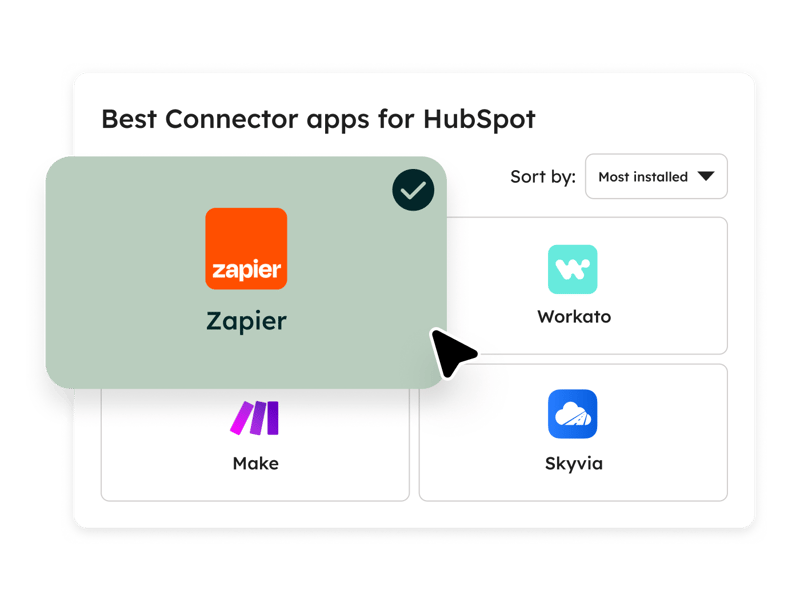
Yes. Depending on the software, the connection can rely on an integration, Data Sync, an API or middleware. The project must define the data to sync and the source of truth for each piece of information.

How do you automate follow-ups with real estate prospects?

HubSpot workflows can trigger tasks, notifications or communications based on prospect status, last interaction, maturity or other business criteria.

How do you measure the ROI of real estate leads?

You need to connect each lead's acquisition source with its progress in the CRM: qualification, appointment, opportunity, then transaction. This lets you compare channels not only on volume but on their ability to generate revenue.

Which KPIs should a real estate CRM track?

Key metrics can include lead volume, response time, qualification rate, conversion rate, number of appointments, pipeline, revenue, acquisition cost and performance by agency, development or channel.

How do you use AI in a real estate CRM?

AI can help qualify some enquiries, sum up prospect history, prepare sales interactions and flag signals that call for action. The quality of the results depends directly on the quality of the available data.

How does Copernic support real estate players on HubSpot?

Copernic works on CRM strategy, lead management, sales processes, migrations, integrations, data, automation and reporting to fit HubSpot to the specific challenges of real estate organisations.

From reservation to handover. No client lost from sight.

Build HubSpot around your agencies, teams, properties, developments and client journeys to turn more contacts into opportunities and steer your real estate performance.