










HubSpot audit: is your CRM costing you sales?
Sales reps working around the tool, duplicates, workflows whose logic nobody remembers, reports nobody believes anymore, licenses paid for nothing. Copernic audits your portal, your data, your processes and your licenses, then hands you an action plan prioritized by impact on your revenue. An audit for an SMB takes a few days. One for a large enterprise covers several portals, business units and integrations.
Your portal has grown.
Its logic got lost.
HubSpot evolves with your company. New teams arrive, processes change, properties multiply, workflows pile up and new tools get connected. A setup that made sense two years ago can gradually become hard to understand, maintain or evolve.
Data that has become hard to trust
Duplicates, unused properties, missing information, inconsistent formats or unclear responsibilities: when data is no longer properly governed, teams lose trust in the CRM and reports become harder to use.
Telltale sign
Several teams use different figures or definitions for the same indicator.

Workflows nobody dares to touch
Automations have multiplied from one project to the next. Some overlap, others rely on rules that no longer match the current organization, and their documentation is sometimes nonexistent.
Telltale sign
Every change requires lengthy checks for fear of side effects.

CRM processes that teams work around
Sales reps work in side files, some information is no longer filled in, or pipeline stages are interpreted differently. The CRM no longer fully reflects operational reality.
Telltale sign
Part of the business process always happens outside HubSpot.

Indicators that have become hard to believe
Dashboards have piled up, but their definitions, filters or source data are no longer controlled well enough to steer with confidence.
Telltale sign
A steering meeting starts with a debate about whether the figures are reliable.

A portal that has become hard to evolve
New business unit, new offer, international expansion or reorganization: every change now requires extra properties, workflows or workarounds.
Telltale sign
A simple business request quickly turns into a complex CRM project.

HubSpot no longer matches real usage
Processes and configuration have evolved without always following how users actually work. Some features are ignored while side tools appear.
Telltale sign
Teams rebuild in Excel, Notion or other tools what should be managed in the CRM.
What is a HubSpot audit and what should it really analyze?
A HubSpot audit compares the portal's actual configuration with business processes, team usage and company goals, to identify the gaps, their causes and the actions needed to fix them.
So it is not just about checking whether HubSpot is “properly set up”. A configuration can be technically valid and still be poorly suited to the organization, produce data that is hard to use or force users into overly complex processes.
The audit must also tell apart what comes from a configuration problem, a data problem, a process problem or an adoption problem. The recommendation differs depending on where the dysfunction comes from.
Everything feels urgent?
Find the cause.
We identify the causes, assess their impact and build a truly prioritized roadmap with you.
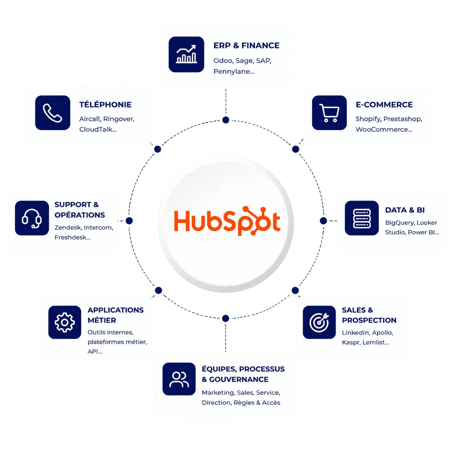
A CRM never lives alone.
Neither does its audit.
HubSpot est rarement le seul outil de votre système d’information. ERP, téléphonie, e-commerce, outils métiers, outils de prospection ou plateformes data alimentent le CRM et exploitent à leur tour ses données.
Lors d’un audit HubSpot, nous analysons donc aussi les connexions qui pèsent sur vos processus et la fiabilité de vos données : sens de synchronisation, sources de vérité, règles de mapping, doublons, erreurs de flux et dépendances entre applications.
Notre conviction :
un problème visible dans HubSpot ne vient pas nécessairement de HubSpot. L’audit doit pouvoir remonter jusqu’à la source du flux pour traiter la cause, et pas seulement le symptôme.
We understand before we judge.
You decide on facts.
Four steps, each read along three axes: processes, technology and people. A dedicated project manager follows you from scoping to the debrief, presented to the steering committee. On your side, one business lead and one CRM lead are enough.
Understand · Think
Scope
Workshops with your business teams and CRM leads: goals, Hubs in use, connected tools, priorities. We start from the way you sell, not from the portal settings.
Model · Think
Analyze
Review of the portal, data, processes and integrations from six angles. Each finding is linked to its cause: configuration, data, process or adoption.
Orchestrate · Build
Prioritize
Each recommendation is ranked by impact, urgency, complexity and dependencies. Quick wins are separated from deeper workstreams.
Steer · Run
Debrief
A debrief session with your decision-makers, backed by a complete document. You leave with a roadmap your teams can execute on their own or with us.
Six angles d’analyse.
Un seul portail.
Du modèle de données aux usages des équipes, nous passons votre portail au crible sous six angles. Pour chacun, nous cherchons la cause d’un dysfonctionnement, pas seulement son symptôme.
Check that HubSpot correctly represents your business
We check that objects, properties, associations and pipelines properly reflect your business model. We spot redundant or overly complex structures, and the dependencies that will slow down your next changes.
Identify what undermines the reliability of your data
Duplicates, missing values, inconsistent formats, obsolete properties, multiple sources: we measure data quality and look for why anomalies keep coming back. We separate what needs a one-off cleanup from what calls for a governance rule.
Streamline workflows that are hard to maintain
Triggers, enrollment criteria, branches, delays, assignment rules: we spot redundant, obsolete or contradictory workflows. A critical automation must be understandable and editable without depending on the one person who built it.
Check that your KPIs really support decisions
We review source properties, calculation methods, filters and dashboards. A useful indicator rests on a shared definition and reliable data. Reports that spark debates about the numbers instead of helping decide are flagged.
Keep the portal under control over time
Permissions, roles, conventions, documentation, responsibilities: we look at how the portal is administered day to day. The goal is to keep the same problems from coming back a few months after the fixes.
Compare HubSpot with how teams actually work
We compare the configured processes with the real practices of Marketing, Sales and Service teams: qualification, lifecycle, pipelines, tickets. These gaps often explain workarounds, incomplete data and low adoption.
A report is not enough.
You need a course.
At the debrief, you leave with a diagnostic, priorities and a roadmap. Each recommendation says what to do, why, in what order and with what complexity.
Structured diagnostic
A consolidated view of anomalies, risks and strengths.
Clear priorities
Recommendations are ranked by impact.
Quick wins
Quick improvements are separated from heavy workstreams for fast results.
Roadmap
A clear path to organize the next changes.
Clearer architecture
CRM rules become easier to understand.
Stronger governance
The responsibilities needed to maintain quality are identified.
Documented trade-offs
Teams understand why each action is a priority.
More reliable decisions
Leadership knows which CRM workstreams to launch next.
Pitfalls to avoid
A flattering audit reassures.
A useful audit unsettles a little.
An audit rarely fails for lack of technical skills. It fails because it looks at the portal without looking at the company. Here are the six mistakes we avoid from scoping onward.
- Auditing settings without talking to users
- Cleaning duplicates without asking why they keep coming back
- Adding workflows to fix other workflows
- Forgetting connected tools, their rules and their API call limits
- Recommending a higher license before using the current one fully
- Delivering a list of findings without saying where to start
Case study
Pix4D: a HubSpot portal
rebuilt after an audit.
A portal audited a few years after migrating from Salesforce.
Pix4D used HubSpot for sales and marketing, but no longer knew what was holding back CRM usage or where to start.
A photogrammetry software publisher with several divisions, and a HubSpot portal fed largely by an in-house tool.
Many duplicates, duplicated or unused properties, lists and workflows, and lifecycle stages barely used.
A debrief meeting, a complete document, then consulting workshops to put the recommendations into action.
“A clear view of all the problems to solve”, according to the Sales Operations team, and a basis for planning the roadmap.
What clients say
An outside view.
Actionable next steps.
Two hours of recommendations
“A concrete recommendation was presented to us for more than 2 hours, put together by a HubSpot expert who pinpointed relevant, actionable areas for improvement.”
Blockers spotted from day one
“Thanks to a perfectly run audit, they pinpointed the blockers from the very start, to help us set up and make full use of HubSpot.”
Rigorous needs scoping
“After rigorous work scoping the needs and processes of the marketing and sales teams, Charline delivered a tailored implementation.”
Reviews translated from French · Scroll →
Cent points de contrôle.
À cocher vous-même.
Évaluez rapidement votre portail grâce à une checklist couvrant CRM, data, marketing, ventes et automatisation.
A quick fix relieves.
A diagnostic heals.
One piece of data, several Hubs.
The audit follows them all.
An audit often goes beyond the scope of a single Hub. Data collected by Marketing feeds sales, customer service, automations and reporting. So we analyze your portal as an ecosystem, not as a collection of features.
Sales Hub
Qualification, pipelines, prospecting, sales activities, sequences and forecasting.
Marketing Hub
Acquisition, segmentation, campaigns, nurturing, scoring, attribution and marketing automation.
Service Hub
Tickets, help desk, SLAs, knowledge base, routing and customer satisfaction.
Content Hub
Websites, content, conversion, personalization and use of CRM data.
Data Hub
Data quality, synchronization, enrichment, governance and data automation.
Revenue Hub
Products, quotes, payments and revenue processes when these uses are in scope.
HubSpot has awarded Copernic its highest partnership tier and four accreditations. They attest to platform mastery. 10+ years of projects and 800+ clients attest to the rest.
Elite Partner and 4 accreditations
CRM implementation · Onboarding · Data migration · Solutions architecture
One hundred points checked.
Ten years of portals audited.
An audit shapes your next CRM workstreams. It takes as much business understanding as platform mastery: that has been Copernic's job for 10+ years.
Key takeaway
Causes first.
Actions next.
A HubSpot audit does not start with the features you don't use. It looks for what stops your organization from properly using the ones it really needs.
- Analyze the structure before adding new tools
- Make data reliable before adding more automations
- Check processes before changing workflows
- Compare the configuration with how teams really work
- Prioritize recommendations by business impact
- Turn the diagnostic into an executable roadmap
FAQ: HubSpot audit
How long does a HubSpot audit take?
A few weeks, specified after scoping. The duration depends on the number of Hubs in use, the teams to interview and the tools connected to HubSpot. We set it with you once the scope is agreed, along with the dates of the workshops and the debrief.
What does a HubSpot audit deliverable include?
A clear diagnostic of your portal: what works, what holds you back (data, workflows, reporting, adoption) and why. You leave with recommendations ranked by impact, urgency and complexity, quick wins separated from deeper workstreams, and a roadmap you can execute on your own or with us. Everything is presented in a debrief session.
What happens after the audit?
The choice is yours. Your admins can handle the quick wins, and our consultants can take on the structural workstreams: data model, workflows, integrations, reporting. Workshops can follow the debrief to turn recommendations into action, and we can support their implementation.
Do I need to stop using HubSpot during the audit?
No. The audit runs alongside your operations, with no interruption to your business. We review the configuration, data, workflows and integrations without changing anything without your approval. Only the workshops and interviews take up your teams' time.
What do you need from us?
Access to the portal with sufficient rights, a business lead, a CRM or data lead, and a few hours of your teams' time for the workshops. If tools are connected to HubSpot (ERP, telephony, e-commerce), documentation of those flows or a contact at their vendor saves us time.
Does the audit cover integrations and licenses?
Yes. We check sync directions, sources of truth, mapping rules, flow errors and the API call limits of connected tools. We also compare your licenses with your real usage: some features, such as custom objects, require an Enterprise edition. We tell you whether it is justified, or whether what you have is enough.
Enough quick fixes.
Time for an action plan.
An expert calls you back within one business day.