










HubSpot onboarding: start on solid ground from day one

Copernic structures, configures and rolls out your HubSpot environment around your processes, your data and how your teams work, to build a CRM that is operational, adopted and able to evolve with your organization, whether you are an SMB starting on HubSpot or a mid-sized company rolling out several hubs at once.

Talk to an expert See the case study
HubSpot Elite Partner
HubSpot Onboarding accreditation
800+ clients supported
Your challenges

The first weeks set the rules.
For years.

Buying HubSpot is not enough to change how an organization works. The decisions made in the first weeks, on architecture, properties, pipelines, automations, integrations or governance, shape the quality of the CRM and its adoption by teams for the long run.

Copernic HubSpot data audit expert
Scoping

You don't know where to start

Marketing, Sales, Service, Data: the possibilities are many and internal requests pile up fast. Without prioritization, the project risks becoming a string of settings with no real overall consistency.


Telltale sign

Each team arrives with its own list of features to set up, with no shared view of the target CRM.

HubSpot workflow expert
Processes

Your processes are not yet formalized enough

Sales stages, qualification rules, responsibilities or customer journeys often exist in practice without being clearly documented. Copying them straight into HubSpot risks locking in existing ambiguities.


Telltale sign

Two users describe the same process, or the criteria for moving from one stage to the next, differently.

CRM process audit consultant
Data

Your data is not ready for the CRM yet

Multiple sources, different naming conventions, legacy fields or unclear responsibilities: importing data without scoping can carry existing quality problems into HubSpot.


Telltale sign

You don't yet know exactly which data to bring over, where the reference source is or who should maintain it.
Copernic HubSpot reporting expert
Automation

You want to automate before the rules are stable

HubSpot makes it easy to build workflows, but automating a poorly defined process does not make it better. It can instead multiply exceptions and make the setup hard to maintain.


Telltale sign

The first workflow requests arrive while business rules and responsibilities are not yet settled.

Copernic HubSpot CRM architecture consultant
Integrations

HubSpot has to fit into an existing information system

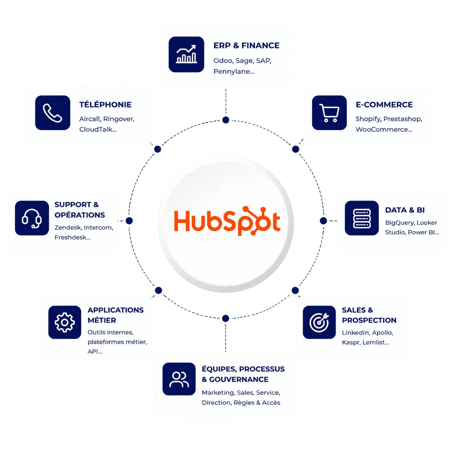
ERP, telephony, e-commerce, business tools, prospecting software or data platforms will often keep running alongside HubSpot. Their role and the data they exchange must be defined from the design stage.


Telltale sign

Several tools hold the same information, but no source of truth has been clearly designated yet.
Copernic HubSpot adoption experts
Adoption

Your teams have to change how they work

Even when configured correctly, HubSpot will not create value if users don't understand the new processes or keep using their old files and tools.


Telltale sign

Training is planned only at the end of the project, with no real involvement of future users during design.
What is HubSpot onboarding and what should it really cover?

HubSpot onboarding is the set of steps needed to turn a newly purchased HubSpot platform into a CRM environment configured around the company's goals, processes and operational needs.

So it is not just about switching on features or copying a standard setup. Onboarding must cover CRM architecture, the data model, business processes, automations, reporting, integrations and user support.

Successful onboarding must also prepare for what comes after rollout. Your organization must be able to administer HubSpot, understand it and evolve it without every new need adding complexity.

  CRM architecture
  Business processes
  Data & integrations
  Adoption & governance

HubSpot is chosen.
Let's lay the foundations.

Processes, data, automations and adoption: secure your rollout so your HubSpot environment is consistent from launch.

HubSpot & information system

Your information system is already there.
HubSpot has to fit in.

HubSpot often becomes the meeting point of several systems: ERP, telephony, business tools, e-commerce, prospecting software or data platforms. These interactions must be anticipated from onboarding to decide where each piece of data is created, which system is the reference and how it should flow.

So we design HubSpot as one component of your information system. The goal is to avoid double entry, conflicting syncs and architectures that become hard to maintain as soon as the ecosystem changes.


Our conviction:

An integration must not be an afterthought to onboarding. The systems that feed HubSpot must be taken into account from the design of the data model and the processes.

HubSpot at the center of your information system
Our method

Workshops before settings.
Acceptance testing before launch.

Four steps, each covering processes, technology and people. A dedicated project manager follows you from the first workshop to launch, with a project committee and a steering committee.

01

Understand · Think

Define the target CRM

Business, functional and technical workshops clarify your goals, processes, teams, Hubs, data and connected tools. Structural rules are settled and approved in writing before any configuration.

02

Build · Build

Turn needs into HubSpot

We build the CRM architecture and configure properties, pipelines, automations and reporting, documented in a design file. Integrations and data imports follow the approved scope.

03

Implement · Build

Secure usage before launch

Your teams run acceptance testing on each process with real cases. We fix the gaps and train users on their own portal. Nothing goes live without your approval.

04

Steer · Run

Go live without losing the team

We support the launch, track early usage and adjust what is needed based on field feedback. The goal is to secure adoption while preparing the organization to run on its own.

What we build

We don't switch everything on.
We build what serves you.

Our onboarding combines business scoping, CRM design and HubSpot configuration. The scope is tailored to the Hubs you subscribe to, your organization and your maturity. The goal is not to switch on every capability of the platform, but to build the foundations your current uses need without blocking future changes.

Design a CRM that truly represents your organization

We define the structure of your HubSpot environment: CRM objects, properties, associations, teams, pipelines and management rules. These choices translate your business model into the platform while avoiding a needlessly complex architecture. We also anticipate foreseeable changes so the CRM can support new products, teams or markets without being rebuilt.

CRM objects
Properties
Associations

Build a reliable data model from the start

We determine the data each process really needs, its formats, its sources and the related responsibilities. When existing data must be brought over, we prepare its mapping and transformation rules before importing it into HubSpot. The goal is to avoid building the new CRM on a base that is already hard to use.

Data model
Mapping
Quality

Translate your business processes into HubSpot

We work with the teams involved to formalize Marketing, Sales and Service journeys before configuring them. Stages, qualification criteria, responsibilities, transition rules and exceptions are defined so HubSpot truly supports day-to-day practice. The platform becomes the backbone of the process rather than an extra layer users have to work around.

Qualification
Pipelines
Responsibilities

Automate what should be automated, at the right time

We configure the workflows needed to orchestrate the defined processes: qualification, assignment, notifications, nurturing, data management or internal operations. Each automation answers an identified business rule and stays readable enough to be understood and maintained after launch.

Workflows
Assignment
Nurturing

Connect HubSpot to your information system

We identify the tools that must keep exchanging with HubSpot and define the data, sources of truth and sync rules involved. ERP, telephony, e-commerce, business tools or data platforms are part of the thinking from onboarding, to avoid double entry, inconsistencies and architectures that are hard to evolve.

Connected applications
Synchronization
APIs & flows

Build steering alongside the CRM

We define the indicators teams and leadership need before building the related dashboards. The properties and processes needed to calculate them are built in from the design stage, rather than discovered once HubSpot is live. Reports rest on shared definitions and data that is actually available.

KPIs
Dashboards
Steering

Prepare team autonomy from rollout

We define the permissions, admin responsibilities, conventions and best practices the portal needs to run after go-live. Users are supported on the processes they will actually use. The goal is for HubSpot to keep evolving without always depending on the project team that first configured it.

Permissions
Training
Governance
Deliverables

A CRM delivered, not a construction site.
Every choice is documented.

Deliverables that leadership, business teams, IT and integration teams can actually use.

Integrations

Flows defined with the applications involved.

Data model

Documented properties, objects and management rules.

Configured processes

Operational Marketing, Sales and Service journeys.

Automations

Workflows designed around approved business rules.

CRM architecture

A HubSpot structure aligned with your business model.

Dashboards

Indicators built around steering needs.

Governance

Clear rules to administer and evolve HubSpot.

Trained teams

Users ready for their processes and daily work.

Before launch

Launch is not declared.
It is verified, case by case.

Acceptance testing happens in three stages: we test each process and present the results, your teams check them on their own cases, then we fix the gaps and run the checks again.

The acceptance sign-off is signed after that, not before.

  • Every pipeline walked through end to end on real cases
  • Qualification and assignment rules triggered in front of you
  • Workflows checked, exceptions included
  • Imported data counted: same volumes, associations preserved
  • Dashboards calculated on your own data
  • Access rights checked role by role

Case study

Effy: HubSpot implemented on the B2B side.
And a CRM Manager trained on the processes.

A leader in online energy renovation, Effy serves both homeowners and building professionals. After optimizing lead nurturing on the B2C side, Copernic implemented HubSpot CRM on the B2B side to align how both businesses operate.

Effy's new CRM Manager was trained on the tool, and also on the business processes they would be administering.

+15%lead-to-customer conversion

See the Effy case study

  • Implement HubSpot CRM for Effy B2B
  • Make the CRM a real acquisition lever
  • Train and onboard the new CRM Manager
  • Optimize data exchanges with sales tools

What clients say

They launched HubSpot.
Their teams followed.

A guided implementation

“We called on the Copernic agency for our HubSpot implementation, and we are delighted! […] They adapted to our specific needs while guiding us toward best practices […]. Serious, human and effective support.”
L. PudduHomelior

Method and tool training

“Copernic […] supports its clients on methodology, […] training on the tool. […] regular check-ins that help the company move forward.”
D. RossignonProtoElectronique.com

Training that listens

“Thank you Camille for your patience and for listening. A day full of learning.”
A. DumonsseauFreelance com · B2B services

Reviews translated from French · Scroll →

Decide first.
Configure second.
Camille · HubSpot project manager
HubSpot expertise

One Hub or six.
One single architecture.

HubSpot onboarding is not built the same way whether you roll out your sales CRM, your marketing automation, your customer service or several Hubs at once. Copernic supports the rollout of the entire HubSpot platform, taking into account the dependencies between teams, processes and data.

The goal is not to configure each Hub separately. We build a consistent environment in which Marketing, Sales, Service, Content, Data and Revenue share one CRM architecture and common rules where your uses require it.

Why Copernic

Your foundations last.
Trust them to experts.

Onboarding commits your processes, your data and your teams for a long time. For 10+ years, we have supported organizations with very different processes, teams and information systems in designing and rolling out their HubSpot environment.

1,200HubSpot hubs implemented
800+clients supported
4.9from 300+ client reviews
Talk to an expert

Onboarding accreditation

An Onboarding accreditation.
Earned on real projects.

Copernic is a HubSpot Elite Solutions Partner and holds the HubSpot Onboarding accreditation. HubSpot awards it to partners who have proven hands-on experience onboarding Professional and Enterprise customers, with a structured, goal-oriented methodology.

Elite Partner and 4 accreditations

CRM implementation · Onboarding · Data migration · Solutions architecture

Key takeaway

Well scoped.
Well adopted.

Successful onboarding is not measured by the number of features switched on, but by what your teams really use after launch.

At Copernic, we don't start by configuring the available features. We start by understanding your organization to determine how HubSpot should be structured.

  • Design processes before configuring HubSpot
  • Structure data before automating it
  • Define responsibilities before building workflows
  • Connect HubSpot to your existing ecosystem
  • Build reporting around the decisions to make
  • Train teams so they can run on their own

Questions fréquentes sur l’onboarding HubSpot

Qu’est-ce qu’un onboarding HubSpot ?

Un onboarding HubSpot est l’accompagnement permettant de concevoir, configurer et déployer HubSpot selon les processus, données, objectifs et usages d’une organisation.

Combien de temps dure un onboarding HubSpot ?

Elle dépend des Hubs déployés, des processus, des données à reprendre, des intégrations et du nombre d’équipes concernées. Un périmètre simple se déploie en quelques semaines ; un projet multi-Hubs avec intégrations et reprise de données demande davantage. La durée est précisée après le cadrage, dans un planning validé avec vous.

Combien coûte un onboarding HubSpot ?

Le coût dépend principalement du périmètre fonctionnel, des Hubs concernés, de la complexité des processus, des intégrations, de la reprise de données et du niveau d’accompagnement nécessaire.

Peut-on réaliser un onboarding de plusieurs Hubs en même temps ?

Oui. Marketing Hub, Sales Hub, Service Hub, Content Hub, Data Hub ou Revenue Hub (anciennement Commerce Hub) peuvent être intégrés dans une même trajectoire lorsque les processus sont interdépendants. Le cadrage global permet alors d’éviter de construire plusieurs environnements fonctionnels en silos.

Quelle différence entre l’onboarding HubSpot et l’implémentation HubSpot ?

Les deux notions sont très proches mais ne recouvrent pas toujours exactement le même périmètre. L’onboarding désigne l’accompagnement permettant de démarrer correctement avec HubSpot ; l’implémentation insiste davantage sur la conception et la configuration opérationnelle de la plateforme. Chez Copernic, l’onboarding intègre ces deux dimensions.

Faut-il définir ses processus avant de commencer l’onboarding ?

Pas nécessairement dans leur forme définitive. En revanche, ils doivent être suffisamment compris pour pouvoir être challengés et formalisés pendant le cadrage. Configurer HubSpot avant d’avoir arbitré les principales règles métier crée généralement de la dette CRM dès le démarrage.

Peut-on connecter nos autres outils pendant l’onboarding HubSpot ?

Oui. ERP, téléphonie, e-commerce, outils métiers ou solutions data peuvent être intégrés au projet. Les sources de vérité, données échangées et règles de synchronisation doivent idéalement être définies dès la conception du CRM.

Peut-on reprendre les données de notre ancien CRM ?

Oui. La reprise est cadrée à part selon le volume, la qualité et la complexité des données historiques : mapping champ à champ, règles de transformation, puis un pilote sur un échantillon avant l’import complet. Pour une migration importante, une démarche de migration HubSpot dédiée peut être préférable.

Qui doit participer au projet d’onboarding en interne ?

Les futurs utilisateurs ne sont pas les seuls concernés. De votre côté, prévoyez un chef de projet, un référent métier et un référent CRM ou data, avec un sponsor capable d’arbitrer. Selon le projet, la DSI ou les équipes data participent aux choix d’intégration. Chaque étape est validée par écrit avant de passer à la suivante.

Pourquoi choisir un partenaire accrédité pour son onboarding HubSpot ?

L’accréditation HubSpot Onboarding reconnaît des partenaires ayant démontré leur expérience sur des projets d’onboarding Professional ou Enterprise et leur maîtrise d’une méthodologie orientée objectifs. Elle constitue donc un niveau de validation plus spécifique qu’une certification individuelle.

Solid ground at the start.
A CRM that lasts after.

Let's scope your processes, data, integrations and uses together. An expert calls you back within one business day.

Talk to an expert