










HubSpot migration: leave your old CRM without losing a single record or a quarter

Afraid of losing history, blocking your sales team for weeks or recreating the same problems in a new tool? Copernic moves your data, history and processes into a restructured, tested HubSpot. From SMBs leaving a first CRM to large enterprises moving off Salesforce or Dynamics. An account manager and a senior consultant scope the migration: allow 6 to 10 weeks for a simple project, 3 to 6 months for a complex one.

Talk to an expert See the case study
HubSpot Elite Partner
800+ clients supported
10+ years of HubSpot expertise
Your challenges

Migrating takes a few months.
Migrating badly costs years.

Changing CRM affects data, processes and users all at once. Problems rarely show up when you click "import": they come from poorly understood data, history that is hard to restore, implicit business rules or dependencies on other tools in the information system.

Copernic HubSpot data audit expert
Data

You don't know exactly what needs to be migrated

Over the years, properties, objects and history have piled up in your CRM. Bringing everything over would add needless complexity, but deleting too much can hurt teams or reporting.


Telltale sign

Nobody knows exactly which data is still used and which can be dropped.

HubSpot workflow expert
Quality

Your source data is not reliable enough

Duplicates, free-text values, obsolete fields, inconsistent formats or incomplete data complicate the move. Importing these problems untreated simply moves them into HubSpot.


Telltale sign

Your teams regularly fix the same data by hand in the current CRM.

CRM process audit consultant
History

You need to keep several years of interactions

Notes, emails, calls, tasks, tickets or activities can be essential to keep the customer context. Bringing them over, however, requires identifying what is technically recoverable and genuinely useful to teams.


Telltale sign

Losing the history would stop your sales or customer service teams from understanding some existing relationships.

Copernic HubSpot reporting expert
CRM model

Your old data model doesn't match HubSpot

Objects, relationships and operating rules differ from one platform to another. A field-for-field match is rarely enough to rebuild how the CRM should work.


Telltale sign

Some data in your current tool has no obvious equivalent in HubSpot.

Copernic HubSpot CRM architecture consultant
Continuity

Your business can't stop during the migration

During the project, teams keep creating contacts, closing deals and handling requests. So the transition period and the cutover between the two environments must be organized.


Telltale sign

Your source database will keep changing until the day HubSpot goes live.

Copernic HubSpot adoption experts
Ecosystem

Your CRM is connected to other applications

ERP, telephony, marketing automation, support or business tools often keep exchanging data with the CRM. The migration must plan for reconnecting them or for their coexistence with HubSpot.


Telltale sign

Changing CRM alters several existing data flows in your information system.
What is a HubSpot migration and what really needs to be migrated?

A HubSpot migration is the structured transfer of the data and items you need from an existing CRM or application to HubSpot. Depending on the source system and business needs, it can cover contacts, companies, deals, tickets, activities, associations, files or custom objects.

But a HubSpot CRM migration is not about mechanically reproducing the old environment. Changing CRM is a chance to rethink the data model, properties, pipelines and processes, so you don't carry years of complexity that no longer serves you into HubSpot.

The migration strategy therefore depends on the source CRM, volumes, data quality, the history you need and the systems that will keep running after cutover. Migrating everything is neither always possible nor always desirable.

 Data & history
  Mapping & transformations
  CRM processes
  Testing & cutover

An inherited HubSpot? A clean base.

Before moving any data, let's scope the target model, the history to keep and the migration rules your HubSpot migration needs.

HubSpot & information system

Not everything migrates.
Every piece of data has its place.

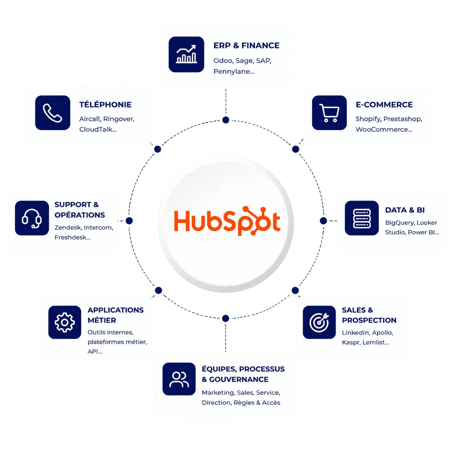
Your old CRM is only one part of your information system. ERP, e-commerce, telephony, business tools or data platforms may keep running after the migration. So you must decide which data becomes HubSpot's responsibility and which stays managed elsewhere.

We identify the systems you keep, the new sources of truth and the flows needed after the migration. This approach keeps HubSpot from becoming a copy of your information system and prepares the integrations the new environment needs to run.


Our conviction:

a CRM migration is also an architecture decision. Before moving a piece of data, you need to know which system will own it tomorrow.

HubSpot at the center of your information system
Our method

We test before cutover.
You choose go-live day.

01

Understand · Think

Audit the source and define the target

We analyze the existing CRM, its objects, properties, relationships, volumes and history. With business teams, we define what should be migrated, transformed, archived or dropped, and design the target model in HubSpot.

02

Model · Think

Clean, map and transform the data

We map the source and target models, then prepare the transformation rules. Anomalies found are handled before migration, so the old environment's problems are not imported for nothing.

03

Transpose · Build

Test before cutover

We run the required data loads according to the agreed scenario and check volumes, properties, associations and history. Tests validate how the data behaves in HubSpot before the final switch.

04

Prove · Run

Check the migration and secure go-live

We run the consistency checks needed after migration and support the cutover to the new environment. Teams can then find their information in HubSpot and resume operations within the agreed framework.

Migration scope

Every source tool has its traps.
Every migration, its plan.

The migration strategy depends heavily on the system you are leaving. Migrating a structured CRM with several years of history doesn't involve the same trade-offs as bringing over Excel files or replacing a customer service platform. We adapt the scope, mapping and migration method to your environment.

Migrate your CRM to HubSpot

We support migrations from Salesforce, Microsoft Dynamics, Pipedrive, Zoho, Sellsy and other CRMs. Contacts, companies, deals, activities and specific objects are analyzed before being restructured in the HubSpot model.

Salesforce
Dynamics
Pipedrive
Zoho

Move from your support tool to Service Hub

A migration from Zendesk, Freshdesk or another support platform may require bringing over contacts, tickets, history, users and the information needed to handle requests. Target processes are rebuilt in Service Hub to ensure operational continuity.

Zendesk
Freshdesk
Tickets
History

Bring marketing automation and CRM together in HubSpot

We support migrations from email or marketing automation platforms when the goal is to centralize more of the customer journey in HubSpot. Contacts, segmentation and the items needed for marketing processes are analyzed before migration.

Brevo
Mailchimp
ActiveCampaign
Marketing automation

Turn your files into a real CRM model

Migrating from Excel, Access or an in-house database first requires understanding what the data means and how it relates. We clean, normalize and structure this information before importing it into HubSpot.

Excel
In-house databases
Normalization
Mapping

Migrate your content to the HubSpot ecosystem

When a project includes Content Hub, the migration can also cover the content of a website, a blog or conversion pages. This work needs a specific approach covering architecture, content, forms and SEO.

WordPress
Drupal
Webflow
Content Hub

Run HubSpot alongside the systems you keep

A migration doesn't necessarily mean replacing your whole information system. Some data or functions can stay in an ERP, a group CRM or a business application. We then define what migrates to HubSpot and what must keep syncing.

Coexistence
Synchronization
Hybrid IS
Integrations
What we migrate

Data without context is worthless.
We bring over both.

A reliable migration is not about importing several CSV files one after another. CRM data is interconnected: an activity belongs to a contact, a deal to a company, a ticket to a customer. We prepare the migration with these relationships and the expected uses in HubSpot in mind.

CRM data


Contacts, companies and business information

We clean, transform and map the properties the target model needs, to preserve the quality and meaning of the information brought over.

Deals & pipelines


Rebuild the sales
context

Opportunities, amounts, stages, owners and associations are brought over according to the structure defined for the new HubSpot pipelines.

Activities & history


Keep the context teams need

Notes, tasks, calls, meetings and other history are reviewed against the source system's capabilities, what can be migrated and their operational value.

Tickets & customer service


Preserve customer relationship continuity

When the scope includes Service Hub, we prepare the migration of tickets and the information teams need to find the context of each request.

Objects & associations


Rebuild the relationships between your data

Standard objects, custom objects and associations must be designed together so the data keeps its structure after migration.

Processes & automations


Rebuild rather than
copy

The previous system's pipelines, business rules and automations are analyzed, then adapted to HubSpot's capabilities and model rather than reproduced.

Cas client

Transformer une migration CRM complexe en nouveau socle de données

Pour Homunity, la migration de Salesforce vers HubSpot a été l’occasion de reprendre un volume important de données tout en repensant leur organisation et les processus CRM, afin de repartir sur un environnement plus cohérent et exploitable.

Real estate investment CRM migration RevOps
Homunity logo

Moving from Salesforce to HubSpot without reproducing existing silos.

A CRM migration that became the chance to redefine Marketing, Sales and RevOps processes around one shared vision.

See the Homunity case study →

The CRM as a chance to reset the rules of the game.

Context

A strategic migration with the goal of harmonizing Marketing and Sales processes.

Challenge

Different definitions of a qualified lead and unreliable sales reporting.

What we did

Process mapping, shared qualification rules and a CRM architecture aligned with the new model.

Result

A clearer organization, documented processes and shared steering between Marketing and Sales.

 
194k
contacts migrated
 
141k
companies migrated
 
< 3 months
to complete the migration

What clients say

They changed tools.
Without losing their stride.

From Salesforce to HubSpot

“Copernic is a very reliable agency, very diligent in its work. They supported us in our migration from Salesforce to HubSpot. I especially appreciated the advice given at every step of the migration.”
M. Zayateasiware · Software and SaaS

Pardot replaced in 3 months

“We started with Copernic in September 2022 for a migration from Pardot to HubSpot. Migration completed successfully in just 3 months, thanks to the Brice/Bruno duo. The workshops were efficient, well prepared beforehand and followed up right away.”
S. Le GrosCentreon · Software and SaaS

A calmly steered cutover

“A migration, a change of habits and practices, is never simple to steer. Mathilde's exceptional support helped us overcome these challenges calmly and efficiently.”
D. JeromeGlobal Connect · Telecommunications

Reviews translated from French · Scroll →

Brice Germain, junior partner at Copernic, in a client workshop
Before you commit,
validate the model.
Brice Germain · junior partner, business and process expert
HubSpot expertise

One single database.
Every team gets what it needs.

A migration can involve much more than sales data. Depending on your project, we prepare the new environment so Marketing, Sales, Service, Content or Operations teams can use the migrated information in their processes.

Why Copernic

Years of history at stake.
An accredited team to bring them over.

A migration involves years of data, history and sometimes critical processes. It requires as much command of the HubSpot model as rigor in analyzing, mapping, transforming and checking the information brought over.

Copernic is a HubSpot Elite Solutions Partner and holds the HubSpot Data Migration accreditation. HubSpot states that this accreditation validates the skills and strategic experience needed to migrate legacy CRM platforms to HubSpot Smart CRM, including large-scale migration projects.

800+clients supported
1,200HubSpot hubs implemented
130HubSpot certifications
4HubSpot accreditations

Data Migration HubSpot Accreditation

HubSpot Data Migration


An accreditation dedicated to complex CRM migrations

It validates a skill set directly aligned with the job: designing and running CRM data migrations to HubSpot, beyond simple functional command of the platform.


Key takeaway

Migrate what's useful.
Rethink the rest.

A HubSpot migration means transferring the useful data, history and processes from an existing CRM or tool to HubSpot, while keeping them consistent and usable in the new environment.

At Copernic, we don't try to reproduce the old CRM identically. We decide what should be kept, transformed, restructured or dropped before building the target model in HubSpot.

  • Map the data before moving it
  • Clean before importing into HubSpot
  • Keep the history that really matters
  • Rethink the model rather than copy the old one
  • Test every data load before cutover
  • Secure business continuity

FAQ – Tout savoir avant une migration vers HubSpot

Qu’est-ce qu’une migration HubSpot ?

Une migration HubSpot consiste à reprendre les données et éléments utiles d’un environnement existant pour les restructurer et les rendre exploitables dans HubSpot.

Quelles données peut-on migrer vers HubSpot ?

Contacts, entreprises, transactions, tickets, propriétés, associations et certains historiques peuvent être concernés selon le système source et le périmètre retenu.

Combien de temps dure une migration HubSpot ?

Comptez 6 à 10 semaines pour une migration simple, et en général 3 à 6 mois pour une migration complexe. Une migration devient complexe quand les volumes de données sont importants, que les objets et les intégrations sont nombreux, ou que plusieurs équipes ou entités sont concernées. La durée précise est fixée à l’issue du cadrage, une fois le périmètre de reprise arrêté et les migrations de test planifiées.

Peut-on migrer de Salesforce vers HubSpot ?

Oui. Une migration Salesforce HubSpot nécessite de faire correspondre les modèles de données, objets, relations et processus des deux plateformes. La reprise doit être conçue en fonction du modèle cible HubSpot plutôt que comme une simple copie de Salesforce.

Peut-on migrer de Pipedrive vers HubSpot ?

Oui. Une migration Pipedrive HubSpot peut notamment concerner les contacts, organisations, deals, activités et informations commerciales utiles. Le périmètre exact dépend de la configuration existante et des usages à reconstruire dans HubSpot.

Peut-on migrer Zendesk vers HubSpot Service Hub ?

Oui. Une migration Zendesk HubSpot peut permettre de reprendre les contacts, tickets et historiques nécessaires à la continuité du service. Les processus, pipelines de tickets, SLA et automatisations doivent ensuite être adaptés au fonctionnement de Service Hub.

Faut-il migrer toutes les données de l’ancien CRM ?

Non. C’est même rarement notre recommandation. Les données obsolètes, inutilisées ou sans valeur opérationnelle peuvent alourdir inutilement le nouvel environnement. Le cadrage doit déterminer ce qui mérite réellement d’être repris, transformé ou archivé.

Peut-on conserver notre ancien CRM pendant la transition ?

Oui, selon la stratégie retenue. Une période de coexistence peut être nécessaire lorsque la migration est progressive ou lorsque certains processus restent temporairement dans le système précédent. Les règles de création et de modification des données doivent alors être clairement définies.

Comment éviter de perdre des données pendant la migration ?

Par le contrôle, pas par la confiance. Volumes, propriétés, associations et échantillons doivent être comparés entre la source et HubSpot. Les scénarios critiques sont testés avant le basculement afin d’identifier les écarts avant la mise en production.

Quelle différence entre migration HubSpot et onboarding HubSpot ?

La migration ajoute un enjeu de reprise de l’existant. Un onboarding construit et déploie un nouvel environnement HubSpot. Une migration doit en plus analyser, transformer et transférer les données et historiques d’un système précédent tout en organisant le passage entre les deux environnements.

Your business model, finally in your tools.

Keep the data and history that matter, eliminate complexity that no longer serves you and build a reliable HubSpot environment with our experts for what comes next.