










HubSpot integrator: connect your CRM to every business tool you run

Re-keying, duplicates, numbers that never match from one tool to the next? Copernic designs and delivers your integrations between HubSpot and your information system: ERP, CRM, business apps, e-commerce, telephony or data platforms, through Data Sync, APIs, native connectors or custom development. From standard connectors for SMBs to multi-ERP architectures for mid-sized companies and large enterprises. Nothing gets built until every flow is scoped and signed off with you.

Talk to an expert See the case study
HubSpot Elite Partner
800+ clients supported
10+ years of HubSpot expertise
Your challenges

Every re-entry costs you.
Every mismatch shows up later.

A HubSpot CRM integration becomes necessary as soon as your teams rely on information produced or used by several applications. Without a clear architecture, the same data gets re-keyed, duplicated or synced under conflicting rules. At that point the problem is no longer just technical: it hits your processes and your trust in the CRM.

Copernic expert auditing HubSpot data
Double entry

Your teams enter the same information in several tools

Sales reps update HubSpot, then have to fill in an ERP or a business tool. Operations then copy part of that information into their own system. This double entry eats up time and quickly opens gaps between applications.


What you see

Two systems regularly show different information for the same customer or the same deal.

HubSpot workflow expert
Source of truth

You no longer know which system holds the right data

HubSpot, the ERP and your business apps can each hold a different version of the same information. Without explicit rules, every team ends up treating its own tool as the reference.


What you see

When a value differs between two applications, nobody knows for sure which one should overwrite the other.

CRM process audit consultant
Processes

Your processes stop at the borders of your software

A deal closed in HubSpot has to trigger an order, an invoice, a service or an action in another system. Without integration, process continuity depends on someone stepping in or on a manual export.


What you see

Teams rely on emails, files or manual tasks to move information from one system to another.

Copernic HubSpot reporting expert
Data

Your syncs create inconsistent data

Mismatched formats, poorly mapped properties, incompatible deduplication rules or uncontrolled two-way syncs can slowly degrade your data instead of making it reliable.


What you see

Some errors keep coming back after being fixed in HubSpot.

Copernic HubSpot CRM architecture consultant
Technical limits

Your standard connector no longer covers your needs

A native integration can handle a simple need perfectly, then fall short once business rules get more complex: custom objects, transformations, conditions, volumes or specific sync logic.


What you see

Your teams pile up workarounds around the connector to handle the cases it cannot process.

Copernic HubSpot adoption experts
Change

Your information system is changing around HubSpot

A new ERP, a CRM replacement, an acquisition or an international rollout: any change to your information system can shift data sources and the role of each application.


What you see

A new application needs to be connected, but its impact on existing HubSpot flows is hard to predict.
What is a HubSpot integrator, and what does it do?

A HubSpot integrator is a specialist that designs, configures and deploys the connections between HubSpot and the other applications your company uses: ERP, CRM, business apps, e-commerce, telephony or data platforms.

The job is not just to “connect two pieces of software”. It decides which data must be synced, which system has authority, which way information flows and which rules apply whenever a record is created or changed.

Depending on the need, a HubSpot integration can rely on a native connector, Data Sync, an API, middleware or custom development. The choice depends on the business process, data volume, exchange frequency and the level of control required.

  Flow architecture
  Sync
  APIs & connectors
  Monitoring

A tool to connect?
Let's scope the flow first.

Show us your applications, your processes and the data to sync. We help you pinpoint the right integration architecture.

Talk to an expert
HubSpot & your information system

HubSpot is one piece.
Architecture does the rest.

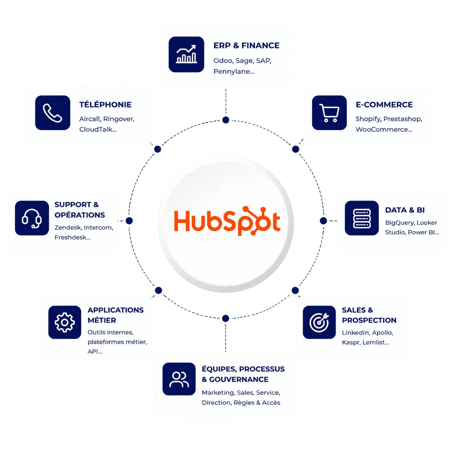
ERP, business apps, e-commerce, telephony, data platforms or invoicing tools can all produce or use information that ends up in HubSpot. So a HubSpot ERP or CRM integration cannot be designed as a simple point-to-point link without looking at the other systems involved.

We map the role of each application, the data exchanged and who owns what, to cut out conflicting flows and needless dependencies. HubSpot then takes its place in a coherent architecture instead of slowly turning into a second system of record for everything.


Our conviction:

Not all data belongs in HubSpot. The CRM should receive the data that truly serves its users and its processes.

Integration architecture: HubSpot at the center of the applications in your information system
Our integrations

One tool, one page.
Every flow explained.

We integrate HubSpot with the applications that run your sales, marketing, customer service and operations processes. Pick your tool family: each page details what flows and how we connect it.

Technologies

Native when it's enough.
Custom when it's needed.

No integration technology beats all the others. A native HubSpot connector can be a perfect fit for a standard process, while a critical flow with specific rules may call for an API or an orchestration layer. We go for the simplest option that will meet the need over time.

Use what exists when it fits the need

We favor an integration already available in the HubSpot ecosystem when its functional coverage, sync rules and level of control truly match the expected process.

Connectors
Marketplace
Configuration

Sync applications compatible with HubSpot

Data Sync syncs selected data between HubSpot and compatible applications. We configure the rules and mappings you need, taking into account the direction of each exchange and the role of each system.

Sync
Mapping
Data rules

Build flows tailored to specific processes

When standard capabilities fall short, a HubSpot API integration gives finer control over the objects, events, transformations and business rules the process requires.

API
Webhooks
Business logic

Orchestrate several applications and flows

A middle layer makes sense when a process spans several systems or needs more advanced transformations and monitoring.

Orchestration
Transformation
Monitoring

Handle architectures that don't fit a standard connector

We design custom integrations when the objects, volumes, business rules or applications involved need their own logic. Custom development is not the starting point: it comes in only when it is truly justified.

Custom
Business apps
Specific flows

Historical data

History is loaded once.
The flow runs every day.

An integration is a continuous sync. A data load is a one-off: it brings past customers, contacts, deals and activities into HubSpot a single time, before the flows take over. There are three methods. The choice depends on the source tool, its API and your data.

01

Export and import

For a tool with no usable API, or only a partial one, and a simple structure. We provide the export template: one file per object, linked by a shared ID. A proven method, with no over-engineering and no business downtime.

02

Migration tool (middleware)

The fastest route when the source tool has an open API and a stable data model. A pilot load is tested before the full cutover, which runs overnight to limit downtime. A delta then catches up the latest entries.

03

Custom API

When the tool is not compatible with middleware, or the data model has to be transformed. The connection is direct and fitted to your target HubSpot. The cutover accounts for API call limits and data volume.

The method is chosen after analyzing a sample of your data, not before.

Our method

Process first.
Code second.

An integration does not start with development. We first scope the process and the role of each system, then design the flows before building and securing them. A dedicated project manager stays with you from the first workshop to go-live, with a project committee and a steering committee.

01

Understand · Think

Understand the systems and the process

Three workshops, business, functional and technical, built on a sample of your data. For each flow, we set its source, its direction, its business rules and the system that has authority.

02

Model · Think

Define the flows and the architecture

Field-by-field mapping, transformation rules, frequencies: everything goes into the scoping document. We compare several approaches and recommend one. Nothing gets built before your written sign-off.

03

Build · Build

Build and test the exchanges

We configure or develop the integration, then test it on a real sample, error cases included. Nothing goes live without written sign-off on this pilot.

04

Prove · Run

Go live and monitor the flows

Go-live, delta catch-up, team training, then error monitoring. Incidents are spotted and fixed as they happen, and the integration evolves with your processes.

At delivery

Acceptance testing is not a matter of faith.
It is counted, record by record.

Acceptance testing runs in three steps: we test and share source and target counts, you check a sample of records in a shared file, then we fix the gaps and rerun the checks. Every result is demonstrated in front of you before the acceptance report is signed.

  • For each object, as many records in HubSpot as in the source tool
  • Every contact linked to its company and its deals
  • Notes, emails, calls and meetings on the right record, with their original date
  • Transformed properties carry the values approved during scoping
  • Every flow triggered in front of you, in the expected direction

Pitfalls to avoid

Six classic pitfalls.
Six decisions to make upfront.

Most integration incidents are decided at scoping, not during development. Here are the six points we settle with you before writing a single line of code.

  • Clean and deduplicate before the first import: a separate workstream to decide on
  • Name a single master system for each piece of data, in writing
  • Plan format changes, property merges and transfers between objects in the mapping
  • Size the flows to the data volume and API call limits of each tool
  • Check licenses: custom objects and sandboxes require HubSpot Enterprise
  • Monitor sync errors, with an alert and an owner

Attachments, marketing emails, workflows, lists and pages do not carry over by default: they are handled separately. On your side, three roles are enough: a project manager, a business lead and a data or CRM lead, with API access at the right permission level.

Which system is the reference for this data?
Everything starts with that question.
Thomas Vallée · HubSpot consultant
Case study

When integration turns three tools into one ecosystem

For Sprinter, the goal was not simply to connect HubSpot to Odoo. Data had to flow between CRM, ERP and e-commerce to streamline processes and give teams a more consistent view of the business.

 
Sprinter blanc
 

Connect HubSpot, Odoo and e-commerce without creating new silos.

Unify sales and operations data to automate exchanges and steer the business better.

E-commerce Odoo + HubSpot ERP integration

Keep data flowing between CRM, ERP and e-commerce.

Context

Sprinter needed to evolve its tech stack to make better use of its data and support its e-commerce growth.

Challenge

Break down the walls between HubSpot, Odoo and e-commerce to keep data continuous across sales, invoicing and inventory.

What we did

Connected HubSpot to Odoo and aligned the flows between the CRM, the ERP and the e-commerce platform.

Result

Better-centralized data to automate processes, ease repeat purchases and sharpen sales steering.

See the Sprinter case study →

What clients say

A committed pair of experts.
Answers that come fast.

Migration and a new CRM

“Thanks to the Copernic agency for their help with the migration and the build of this new HubSpot CRM. The team is there to support us, giving answers or making changes quickly.”
L. KerhousseCIDER · Be My Desk · Real estate

Complementary work

“We were able to work as a complementary pair. I recommend them for their commitment, diligence and professionalism!”
M. BatistaAdPremier · Marketing and media

Scroll →

Reviews translated from French

HubSpot expertise

A connector is not enough.
You need to know every Hub.

A robust integration means understanding both the external system and the way HubSpot structures, automates and exposes its data. Our teams work on CRM objects, associations, properties, automations and the platform's integration capabilities to design flows in their functional context.

Why Copernic

A critical flow is never improvised.
It is architected.

Connecting HubSpot to an information system takes more than mastering an API. You need to understand CRM architecture, data models, dependencies between applications and the business rules that make exchanges reliable.

As a HubSpot Elite Partner, Copernic brings together CRM, data and technical expertise to design and deliver integrations that fit your environment. Our HubSpot accreditations attest in particular to our ability to handle complex architecture and data projects.

solutions architecture design HubSpot Solutions Architecture Design

Design a HubSpot architecture that fits your information system

This accreditation recognizes our ability to design complex HubSpot architectures that account for business processes, connected systems, data flows and technical constraints.

Data Migration HubSpot Accreditation HubSpot Data Migration Accreditation

Secure the data flowing between your systems

This accreditation validates our expertise in migrating and structuring data in HubSpot: data models, mapping, quality, transformations and historical data loads.
800+clients supported
1,200HubSpot hubs deployed
4HubSpot accreditations, including architecture design and data migration

Talk to an expert

Key takeaways

The right flow.
In the right tool.

A HubSpot integrator designs and delivers the connections between HubSpot and the other applications in your information system, so the data that matters to marketing, sales, customer service and operations keeps flowing.

At Copernic, we don't start by picking a connector. We first decide which data must flow, between which systems, in which direction and under which business rules.

  • Set a source of truth for every piece of data
  • Choose the right technology for each flow
  • Eliminate double entry between systems
  • Secure the mapping and sync rules
  • Anticipate errors and technical dependencies
  • Design integrations that can evolve

FAQ: HubSpot integration

Which tools can be connected to HubSpot?

Most ERPs, accounting software, business apps, e-commerce platforms and BI tools can be connected to HubSpot through APIs, native connectors or middleware.

Do I need a connector or a custom API?

It all depends on your architecture: we assess the best option with you (existing connector, Zapier, Make, custom API) based on your use cases, budget and security requirements.

What if my data quality is poor?

We offer a data audit before integration, with recommendations for cleanup, standardization and quality control tools. Deduplication is decided before the first import, as a separate workstream.

Is the integration secure?

Yes. We follow security best practices (OAuth authentication, encryption, logs, error handling) and document the architecture.

What is a HubSpot integrator?

A HubSpot integrator designs and delivers the connections that let HubSpot exchange data with the other applications in your information system.

What is a HubSpot connector?

A HubSpot connector is an integration that exchanges data between HubSpot and another application based on defined objects, mappings and sync rules.

Can HubSpot be connected to an ERP?

Yes. A HubSpot ERP integration can sync selected data between the CRM and the ERP: customers, companies, products, orders or sales information, depending on the process and the capabilities of both systems.

What is the difference between Data Sync and a HubSpot API integration?

The level of customization. Data Sync syncs HubSpot with compatible applications within the options it offers. A HubSpot API integration builds more specific flows when the objects, transformations or business rules go beyond standard capabilities.

Do I always need a custom integration?

No. A native integration or Data Sync is preferable when it meets the need properly. Custom development should be kept for cases where standard capabilities cannot run the expected process with enough reliability or control.

Can data be synced both ways?

Yes, when the need and the systems allow it. A two-way sync must still define precisely which system has authority over each piece of data, to avoid overwrites, loops or conflicting updates.

Can HubSpot be connected to a business app with no existing connector?

Potentially, yes. If the application has the necessary technical interfaces, an integration through API or middleware can be considered. Feasibility depends on HubSpot's capabilities, but also on those of the system to connect.

How do you avoid sync errors?

By anticipating them from the design stage. Mapping, formats, business rules, deduplication, error cases and monitoring must be defined before go-live. A reliable integration must also flag failed flows quickly.

Should historical data be loaded before syncing?

Often, yes. A sync only moves data created or changed after it goes live. Past customers, deals and activities are loaded once, through export and import, a migration tool or an API, before the flows take over. The method is chosen after analyzing a sample of your data.

How long does a HubSpot integration project take?

It depends on the number of flows, the tools involved and data quality. For an integration, count a few weeks, confirmed after scoping once the flows are mapped and the method chosen. If a historical data load is added, it follows migration benchmarks: 6 to 10 weeks for a simple scope, 3 to 6 months for a complex project.

One less entry.
One more sale.

ERP, CRM, e-commerce, telephony, data or business app: trust us with reliable, maintainable flows built around your processes. An expert calls you back within one business day.

Talk to an expert